---
title: Overview
---
The **Kiyotaka Terminal** is your command center. Unlike rigid exchange interfaces, our Terminal is built on a flexible, modular grid system that allows you to fully personalize your workspace.
Whether you are a scalper needing tick-by-tick data or a swing trader focused on macro structure, you can drag, drop, resize, and toggle widgets to fit your unique workflow.
## Available Widgets
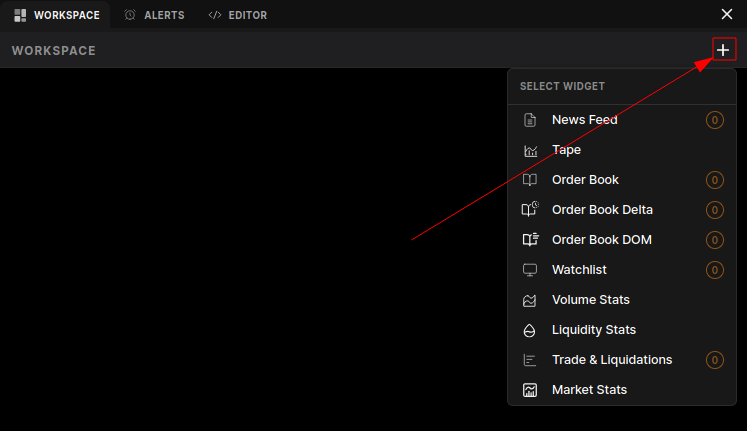
You can activate any of the following modules from the **Widget Menu** (accessible by clicking on the plus icon in the workspace tab).
 ### 📰 Market Intelligence
- **News Feed:** A real-time stream of relevant market news and social sentiment. Stay ahead of catalysts that drive prediction market outcomes. [Read more about News Feed →](news-feed)
### 📊 Order Flow & Liquidity
- **Tape:** The raw, unfiltered feed of all executed trades. Use this to spot "whale" activity and immediate buying or selling pressure. [Read more about The Tape →](tape)
- **Order Book:** View the active limit orders (Bids and Asks) currently waiting to be filled. Essential for finding entry and exit liquidity. [Read more about Order Book →](order-book)
- **Order Book Delta:** A powerful momentum indicator that visualizes the net difference between aggressive buyers and sellers over a specific timeframe. [Read more about OB Delta →](order-book-delta)
- **Order Book DOM (Depth of Market):** A visual heatmap or ladder view of the order book, allowing you to see "walls" of support and resistance at a glance. [Read more about DOM →](order-book-dom)
### 📉 Analytics & Stats
- **Volume Stats:** detailed breakdown of trading volume, often split by "Maker" vs "Taker" or by time intervals (1m, 5m, 1h). [Read more about Volume Stats →](volume-stats)
- **Liquidity Stats:** Metrics tracking market depth and slippage risks. Crucial for larger traders who need to know how much size the market can absorb. [Read more about Liquidity Stats →](liquidity-stats)
- **Market Stats:** High-level overview of the selected market, including 24h Change, Open Interest, and Total Volume. [Read more about Market Stats →](market-stats)
### ⚡ Activity Tracking
- **Trade & Liquidations:** A combined feed showing executed trades alongside significant liquidation events (if applicable to the specific venue/market type). [Read more about Trade & Liqs →](trade-and-liquidations)
- **Watchlist:** Your personalized dashboard of markets you are tracking. Monitor price changes and status across multiple prediction markets simultaneously. [Read more about Watchlist →](watchlist)
---
## Customizing Your Workspace
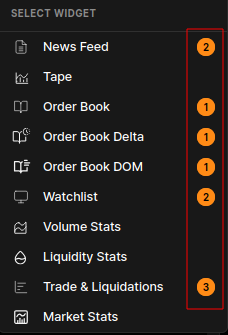
1. **Add Widgets**: Add one or more widgets from the **Widget Menu** (number of widgets added is shown beside the widget selection).
### 📰 Market Intelligence
- **News Feed:** A real-time stream of relevant market news and social sentiment. Stay ahead of catalysts that drive prediction market outcomes. [Read more about News Feed →](news-feed)
### 📊 Order Flow & Liquidity
- **Tape:** The raw, unfiltered feed of all executed trades. Use this to spot "whale" activity and immediate buying or selling pressure. [Read more about The Tape →](tape)
- **Order Book:** View the active limit orders (Bids and Asks) currently waiting to be filled. Essential for finding entry and exit liquidity. [Read more about Order Book →](order-book)
- **Order Book Delta:** A powerful momentum indicator that visualizes the net difference between aggressive buyers and sellers over a specific timeframe. [Read more about OB Delta →](order-book-delta)
- **Order Book DOM (Depth of Market):** A visual heatmap or ladder view of the order book, allowing you to see "walls" of support and resistance at a glance. [Read more about DOM →](order-book-dom)
### 📉 Analytics & Stats
- **Volume Stats:** detailed breakdown of trading volume, often split by "Maker" vs "Taker" or by time intervals (1m, 5m, 1h). [Read more about Volume Stats →](volume-stats)
- **Liquidity Stats:** Metrics tracking market depth and slippage risks. Crucial for larger traders who need to know how much size the market can absorb. [Read more about Liquidity Stats →](liquidity-stats)
- **Market Stats:** High-level overview of the selected market, including 24h Change, Open Interest, and Total Volume. [Read more about Market Stats →](market-stats)
### ⚡ Activity Tracking
- **Trade & Liquidations:** A combined feed showing executed trades alongside significant liquidation events (if applicable to the specific venue/market type). [Read more about Trade & Liqs →](trade-and-liquidations)
- **Watchlist:** Your personalized dashboard of markets you are tracking. Monitor price changes and status across multiple prediction markets simultaneously. [Read more about Watchlist →](watchlist)
---
## Customizing Your Workspace
1. **Add Widgets**: Add one or more widgets from the **Widget Menu** (number of widgets added is shown beside the widget selection).
 2. **Arrange:** Drag the widget header to move it anywhere on the screen.
3. **Resize:** Grab the corner of any widget to scale it up or down.
Your layout is automatically saved to your **User Preferences**, so your setup remains exactly how you left it the next time you log in.
2. **Arrange:** Drag the widget header to move it anywhere on the screen.
3. **Resize:** Grab the corner of any widget to scale it up or down.
Your layout is automatically saved to your **User Preferences**, so your setup remains exactly how you left it the next time you log in.